
Members · Education
Sign in & study MSP.
BNI’s Vietnamese MSP is the “Thành viên Thành công (VI)” programme on BNI Global Academy. Sign in with your BNI Connect account through the “Sign In with myBNI” button, then work through the 8 courses; each lesson needs a score of 80 or more.
Video guide
1 minute 31 seconds long, narrated in Vietnamese with English subtitles. Click a chapter to jump to it.
In short
BNI’s Vietnamese MSP is the “Thành viên Thành công (VI)” programme on BNI Global Academy. Sign in with the “Sign In with myBNI” button using your BNI Connect account, open the programme and work through its 8 courses; each lesson needs a score of 80 or more, with unlimited attempts.
Step by step
There are six steps, from the sign-in page to taking the test; each comes with a real screenshot (red frames mark what to click).
-
Step 1: Open BNI Global Academy, click “Sign In with myBNI”
Go to bniglobalacademy.com. The “Login for Global Admins Only” option is for global admins; members click Sign In with myBNI.

BNI Global Academy sign-in page — red frame: the “Sign In with myBNI” button. -
Step 2: Sign in with your BNI Connect account
The myBNI page opens. Enter your BNI Connect Username and Password, then click LOGIN. If you forgot your password, click Forgot Password on the same page.
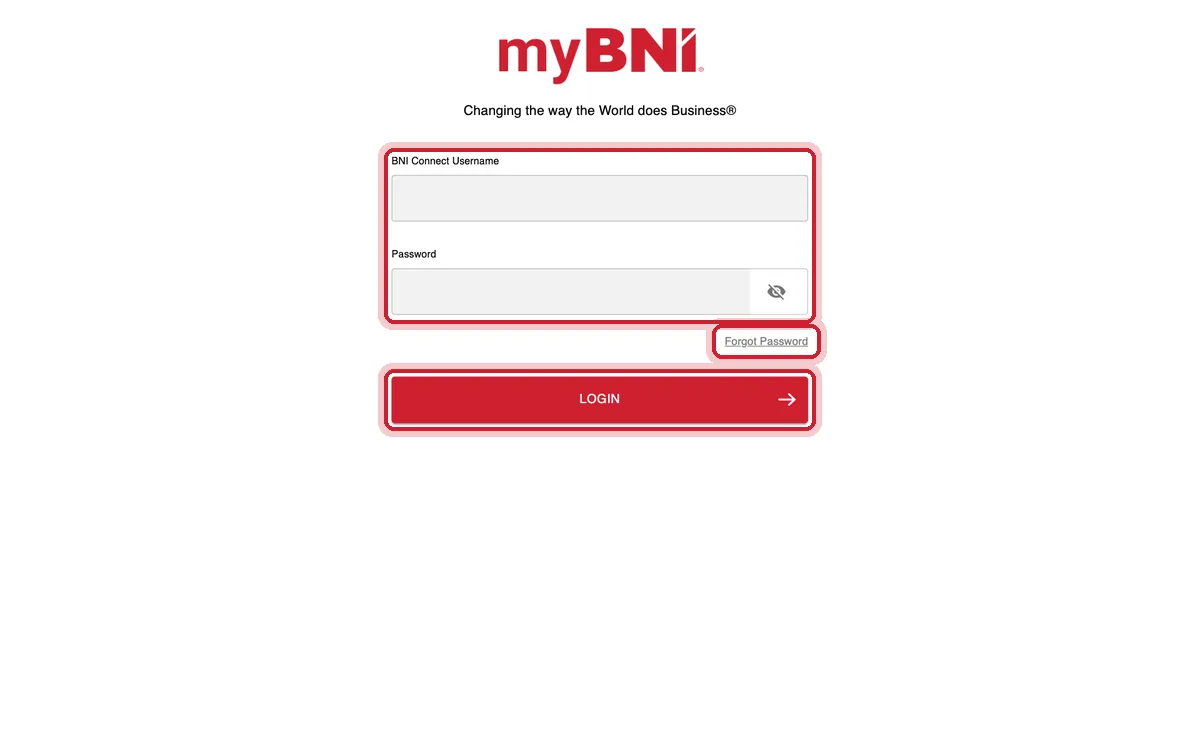
myBNI sign-in page — red frames: username, password, “Forgot Password” and the LOGIN button. -
Step 3: Find the “Thành viên Thành công (VI)” programme
The academy interface is in Vietnamese. Chương trình của tôi (My programmes, left menu) lists the programmes you are enrolled in, with progress. If it is not there, open Danh mục các chương trình (programme catalogue), type “Thành viên Thành công” in the search box, then click Chi tiết (Details) on the “Thành viên Thành công (VI)” card. Items you have not enrolled in show an Đăng ký (Enrol) button. After signing in you can also open the programme link directly.
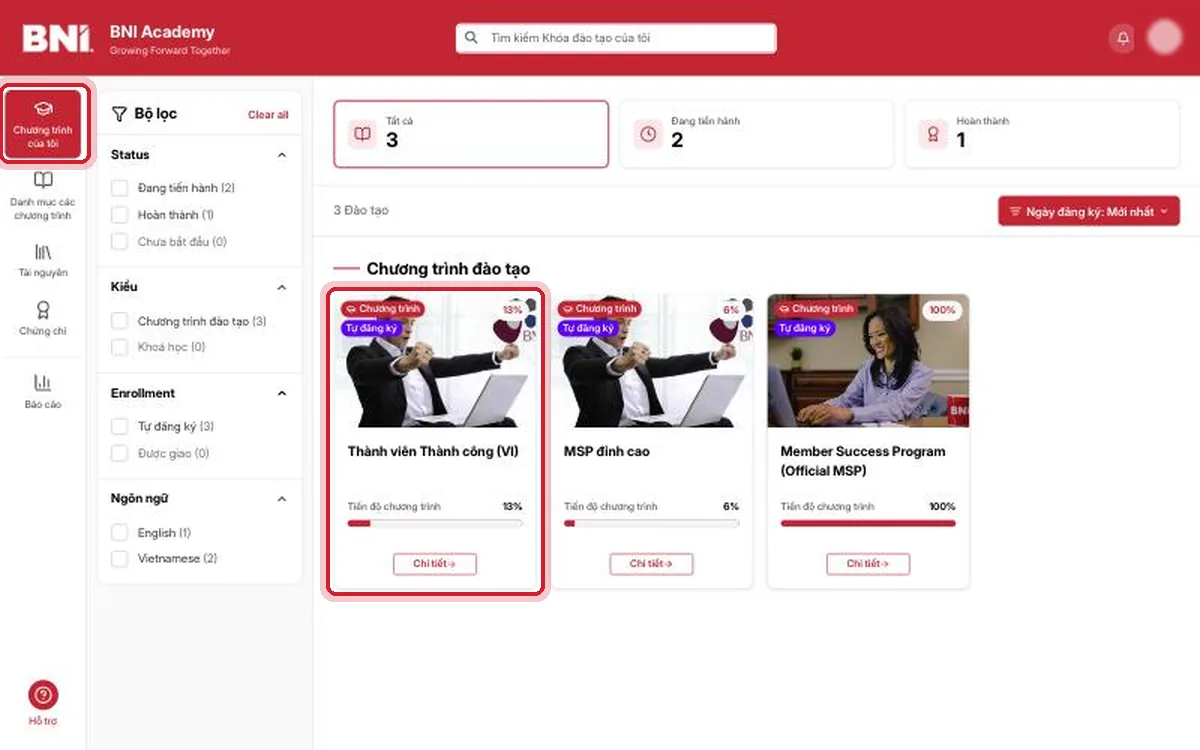
“Chương trình của tôi” (My programmes) — enrolled programmes and progress. 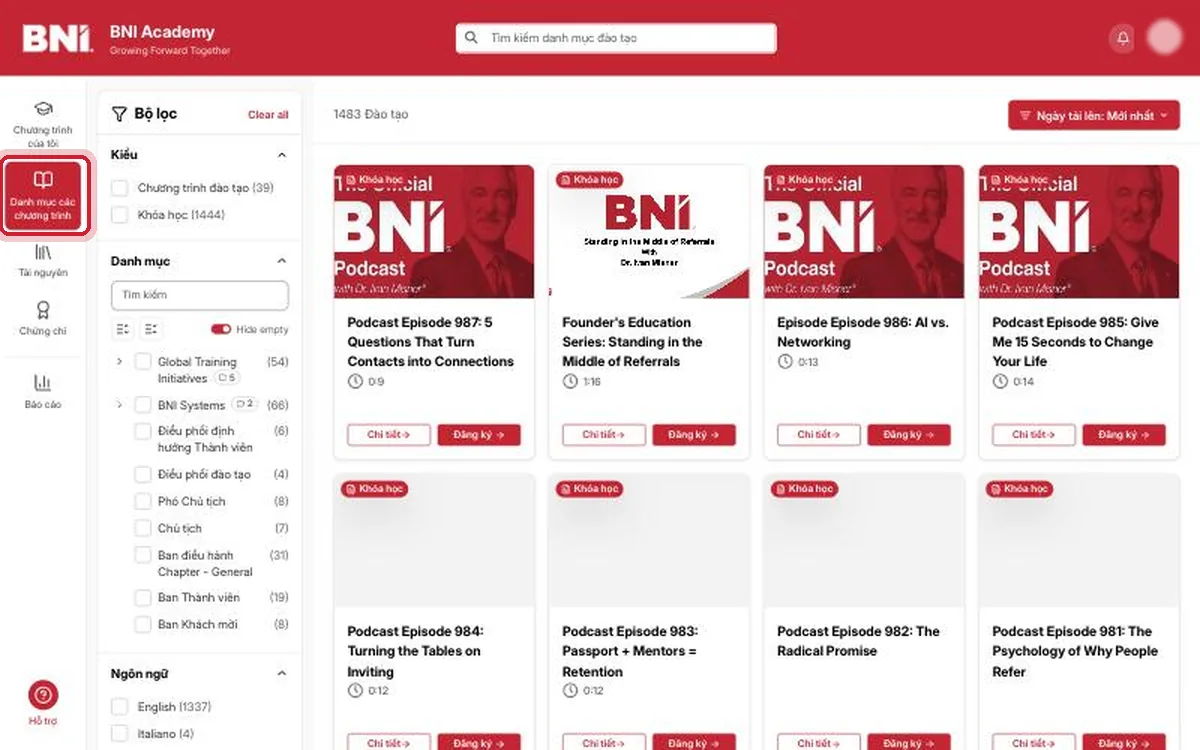
“Danh mục các chương trình” (catalogue) in the left menu. 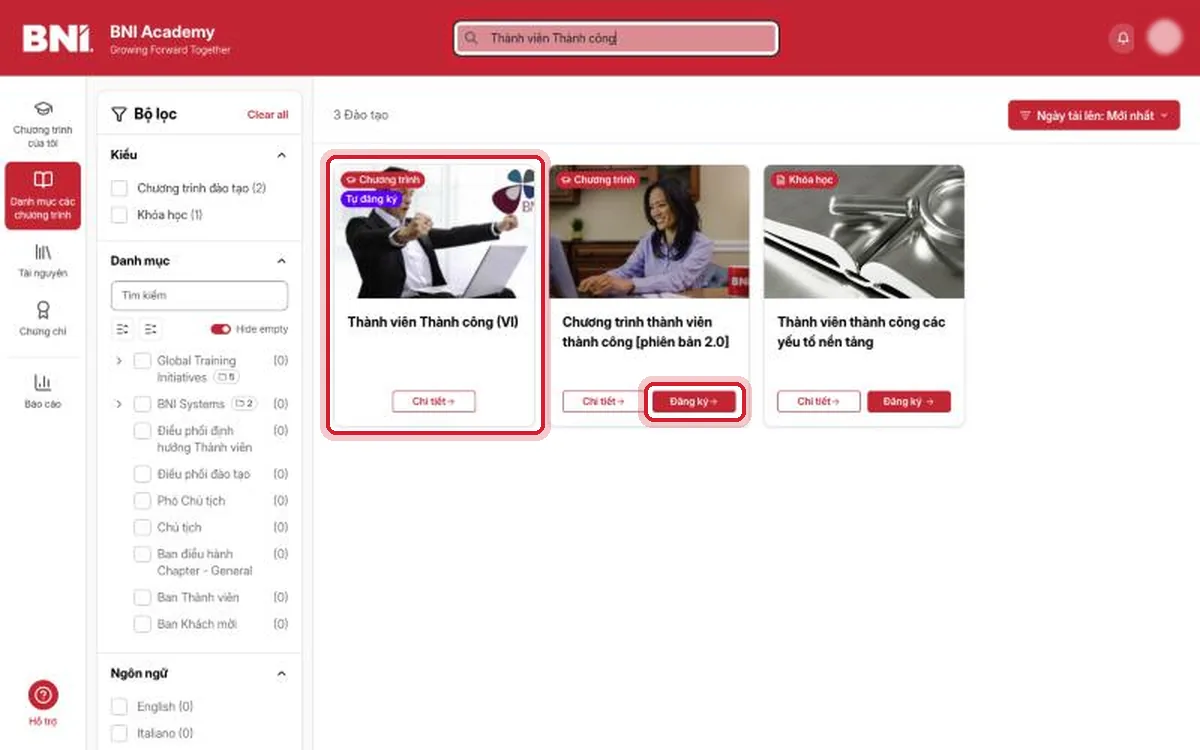
Search results for “Thành viên Thành công”: click Chi tiết; items not yet enrolled show Đăng ký. -
Step 4: Check progress, click “Resume” to continue
The programme page shows the “Chương trình” / “Tự đăng ký” (Programme / Self-enrolled) labels, how many courses are complete (e.g. “1 trong 8 khóa học”, 1 of 8 courses) and the progress percentage. The red Resume: <course> button opens your next course. Below are the 8 course cards, each with its own progress.
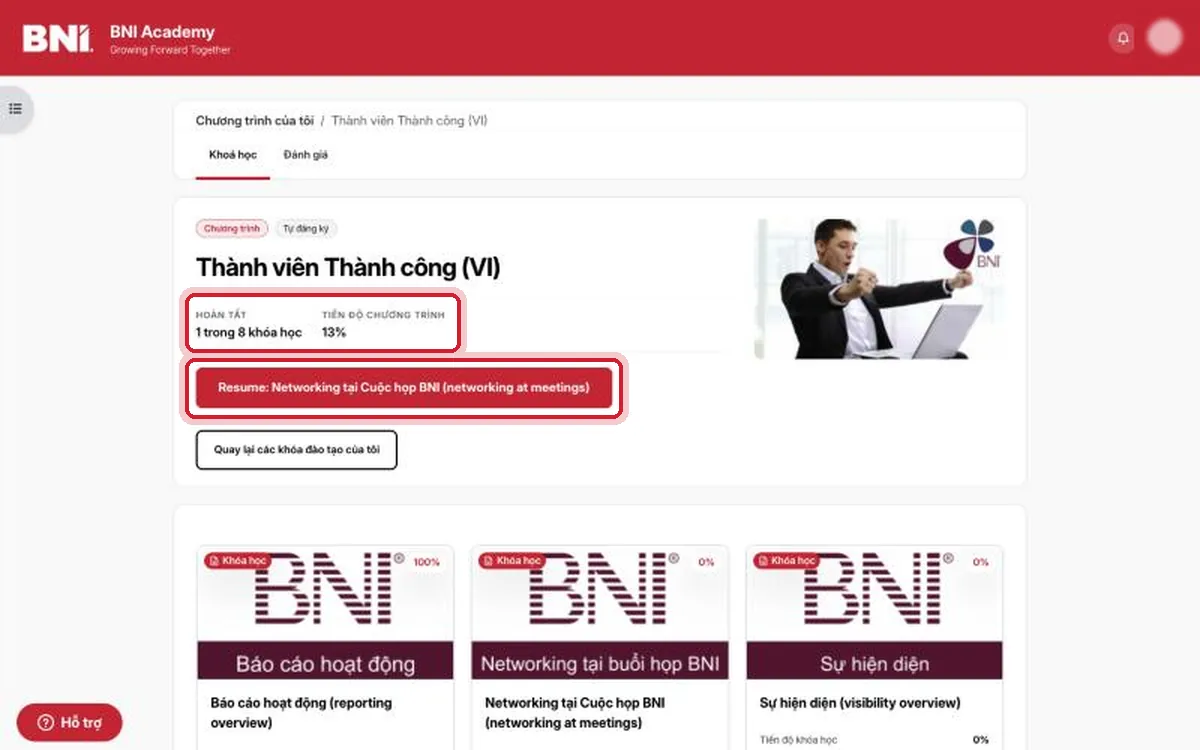
Programme page — red frames: courses completed, progress % and the Resume button. 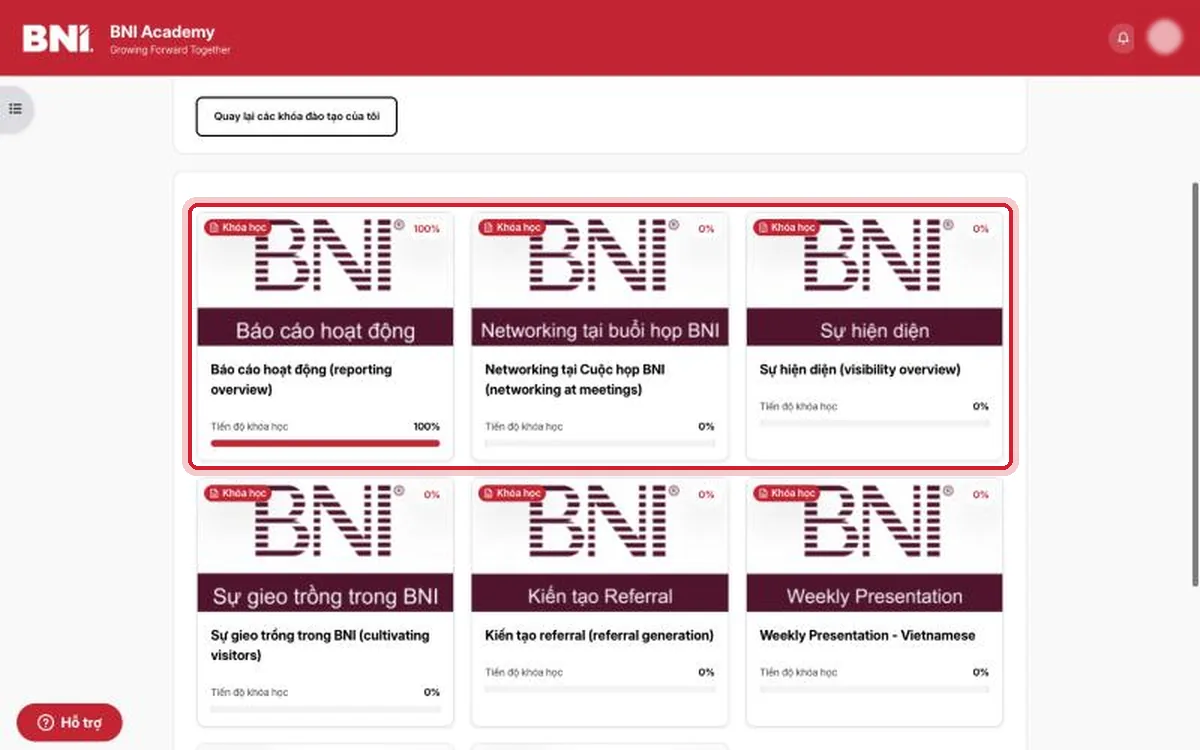
Course cards in the programme, each with a progress percentage. -
Step 5: Open a course, click “Bắt đầu” (Start)
The course page shows “Hoàn tất 0 trong 1 hoạt động” (0 of 1 activities complete) and the course progress. Click the red Bắt đầu: <course> (Start) button.
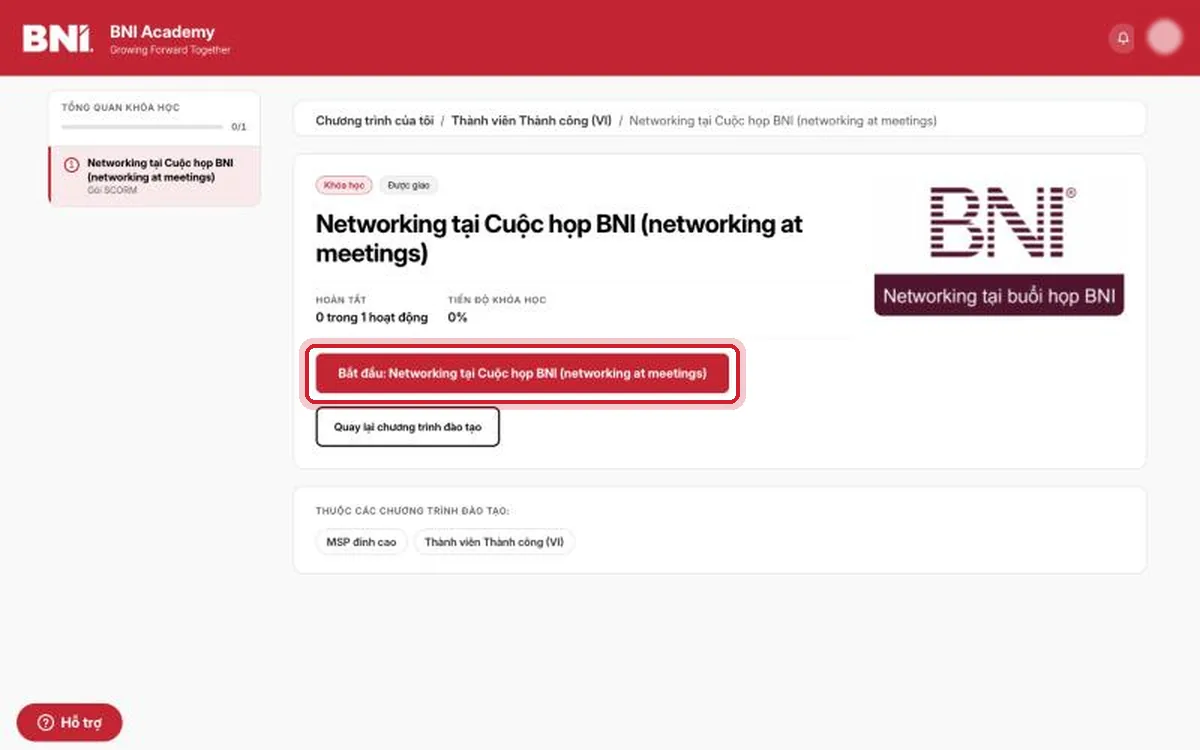
Course page — red frame: the “Bắt đầu” (Start) button. -
Step 6: Click “Nhập vào” (Enter) to study and take the test; score 80 or more
The lesson page (SCORM package) lists the requirements: view, complete or pass the activity, and Receive a score of 80 or more. Click Nhập vào (Enter) to study and take the test. Allowed attempts: unlimited. Work through all 8 courses to complete the programme.
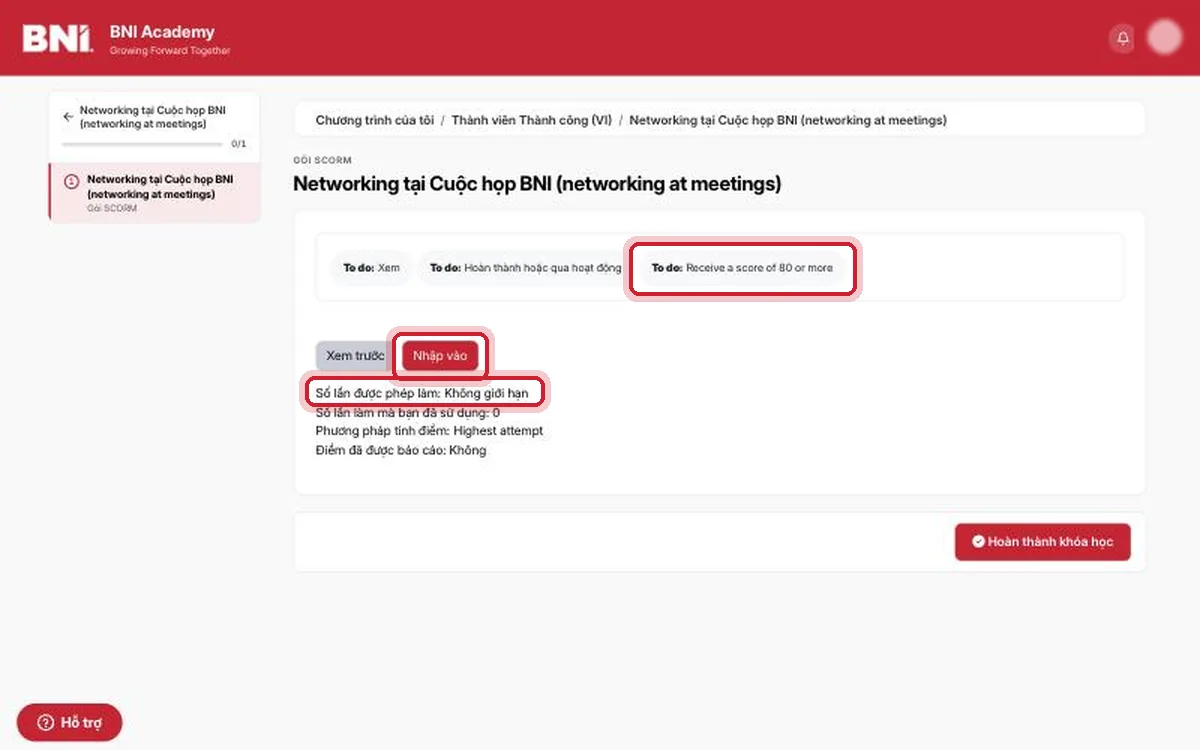
Lesson page — red frames: the 80-point requirement, the “Nhập vào” button and allowed attempts.
Programme requirements
To complete MSP you need a BNI Connect account, all 8 courses and a score of 80 or more in every lesson.
| Item | Detail | Screenshot |
|---|---|---|
| Sign in | “Sign In with myBNI” button + BNI Connect account | Steps 1–2 |
| Programme | Thành viên Thành công (VI) | Step 3 |
| Courses | 8 | Step 4 |
| To pass a lesson | Receive a score of 80 or more | Step 6 |
| Attempts | Unlimited | Step 6 |
The 8 courses in the programme
The programme has the 8 courses below, in the order shown on BNI Global Academy:
| # | Course (as shown) | In English |
|---|---|---|
| 1 | Báo cáo hoạt động (reporting overview) | Activity reporting (reporting overview) |
| 2 | Networking tại Cuộc họp BNI (networking at meetings) | Networking at BNI meetings |
| 3 | Sự hiện diện (visibility overview) | Visibility overview |
| 4 | Sự gieo trồng trong BNI (cultivating visitors) | Cultivating visitors |
| 5 | Kiến tạo referral (referral generation) | Referral generation |
| 6 | Weekly Presentation - Vietnamese | Weekly Presentation - Vietnamese |
| 7 | Hoạt động One-to-One (performing one to ones) | Performing one-to-ones |
| 8 | Tổng quan về sự tham gia (participation overview) | Participation overview |
Need help?
The two most common needs are a forgotten password and someone to guide you:
- Forgot your password: click Forgot Password on the myBNI sign-in page.
- Further help: contact the BNI Expert chapter leadership team — Ms Mai Anh, Education Coordinator, is in charge of member education.
Screenshots of the BNI Global Academy interface taken on 21 November 2026; the interface may change over time. The member’s profile picture has been blurred.
Studying MSP takes three things: sign in with myBNI, open “Thành viên Thành công (VI)”, and complete all 8 courses with 80 or more in every lesson.
Frequently asked questions
What is the Vietnamese MSP programme called on BNI Global Academy?
“Thành viên Thành công (VI)”, with 8 courses.
What score do you need to pass an MSP lesson?
80 or more (“Receive a score of 80 or more”); attempts are unlimited.
Sources
- BNI Global — Exclusive Member Benefits — www.bni.com/exclusive-member-benefits/, read on 23 November 2026.
- BNI Global Academy (sign-in page) — www.bniglobalacademy.com/, read on 23 November 2026.